Home » Messageboard »
Kids' Anti-drug Posters » Message 7029034
From the
Kids' Anti-drug Posters challenge. See all
290 entries (closed)
(
Rails [*·:·], Wed 28 Mar 2007, 23:27,
archived)
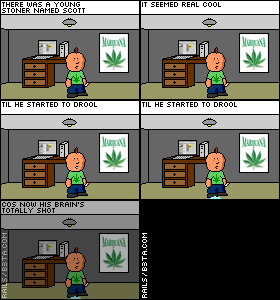
arf!
(
PsychoWardJester hasn't had his weetabix, Wed 28 Mar 2007, 23:28,
archived)
theres something about pixel art
thats just really funky
(
wjh31, Wed 28 Mar 2007, 23:28,
archived)
haha
b3ta on the screen ;)
(
The_Fiend, Wed 28 Mar 2007, 23:28,
archived)
whose clock has still not been updated
..............................................................................see\/
(
wjh31, Wed 28 Mar 2007, 23:31,
archived)
Haha
Oh dear.
(
Ghostwriter oooooooo ooo ooooo ... *scribble*, Wed 28 Mar 2007, 23:33,
archived)
Rob said it'll sort itself out next week
(
Count Vanderhoff trying to learn tattyshop, Wed 28 Mar 2007, 23:36,
archived)
Time will sort itself out?
Crumbs...I wonder what it's going to do? Take us to the year 2525...if man is still alive.
^song reference
(
its_hatorah_bitch is b3ta the devil you know on, Wed 28 Mar 2007, 23:38,
archived)
fair enough
i didnt know that
(
wjh31, Wed 28 Mar 2007, 23:39,
archived)
hmm...why is he puking absinthe?
:S poor guy
(
its_hatorah_bitch is b3ta the devil you know on, Wed 28 Mar 2007, 23:30,
archived)
...
better than keeping it in.
-FACT
(
Rails [*·:·], Wed 28 Mar 2007, 23:31,
archived)
I'll bear that in mind
(
its_hatorah_bitch is b3ta the devil you know on, Wed 28 Mar 2007, 23:35,
archived)
he could make money from it
(
wjh31, Wed 28 Mar 2007, 23:32,
archived)
That's really nice
I spent today playing football with my 5-year-old nephew Scott, and that's exactly how he's going to end up.
If I may be so bold to TJ: I have two gif images I created on gimp I want to turn into a simple animation, can anyone give me some pointers? The gimp documentation's no f
ucking help at all, and I don't really know what I'm doing.
(
The Hedgehog From Hell 's days are numbered, Wed 28 Mar 2007, 23:36,
archived)
its suprisingly simple
put them as laters in the same image, right click-filters-amination-playback, and you can see it as an animation with a default 100ms per frame.
to change the length each frame is up for, you add "(xms)" to the layer name, where x is the length, in milliseconds, for which that frame will appear.
hope this helps
edit: to save as an animation, when you save it add the gif extension, and you should be given the option to save as animation, the rest is self explanatory
(
wjh31, Wed 28 Mar 2007, 23:39,
archived)
Wait, what?
(
Rapitinui comes in a wrapper of cellophane, Wed 28 Mar 2007, 23:37,
archived)
he he I like this lots
(
Laird Dave Draws Now charges to take off his clothes., Wed 28 Mar 2007, 23:38,
archived)
arf! good work
:D
(
monkdagola new website: see profile 4 nutritional information, Wed 28 Mar 2007, 23:42,
archived)