 have one of these silly things
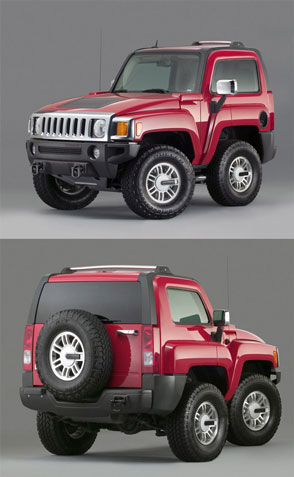
I finally figured out how to do it

unshrunk version - img147.imageshack.us/img147/4914/libertysmallje6.jpg
(unshrunk version - img147.imageshack.us/img147/4914/libertysmallje6.jpg
 PedroHin Come along & ride on a Flantastic Voyage,
Sat 3 Feb 2007, 15:38,
archived)
Your version is a lot nicer.
PedroHin Come along & ride on a Flantastic Voyage,
Sat 3 Feb 2007, 15:38,
archived)
Your version is a lot nicer. The Glum Reaper cannot solve your problem because he has no jam,
Sat 3 Feb 2007, 15:41,
archived)
thanks
The Glum Reaper cannot solve your problem because he has no jam,
Sat 3 Feb 2007, 15:41,
archived)
thanksthat seems to be the trend in automotive body styling doesnt it.
( PedroHin Come along & ride on a Flantastic Voyage,
Sat 3 Feb 2007, 15:43,
archived)
 Arf! Compact cars are the future.
time for repost then?
( pzyko Query failed.,
Sat 3 Feb 2007, 15:42,
archived)
hurrayThis is what made me want to try making one
( Bloop Fri 16 Jul, 22:10,
Sat 3 Feb 2007, 15:47,
archived)
:Dthere are some good examples at W1K too
www.worth1000.com/galleries.asp?rel=Carnocchio&display=photoshop&id=12093
(www.worth1000.com/galleries.asp?rel=Carnocchio&display=photoshop&id=12093
pzyko Query failed.,
Sat 3 Feb 2007, 15:55,
archived)
How do you actually do those?I never got round to finding out.
( Popidge Last ate a kebab on,
Sat 3 Feb 2007, 15:44,
archived)
i googled 'car shrinking photoshop'found this quick blurb which made all the difference to me:
its quite easy to do that, all you gotta do in photoshop is to duplicate the normal wheels, then reduce horizontally the car's size and then put the previously-duplicated-normal-sized-wheels back
(its quite easy to do that, all you gotta do in photoshop is to duplicate the normal wheels, then reduce horizontally the car's size and then put the previously-duplicated-normal-sized-wheels back
PedroHin Come along & ride on a Flantastic Voyage,
Sat 3 Feb 2007, 15:48,
archived)
use photoshop :)make copies of the different bits you want to move and scale, and use layer masks to make everything blend in nicely. That's what I did anyway.
( Bloop Fri 16 Jul, 22:10,
Sat 3 Feb 2007, 15:49,
archived)
Woo ThanksI'll try that later, with a motorbike, if i can.
( Popidge Last ate a kebab on,
Sat 3 Feb 2007, 15:52,
archived)
chainsaw the middle out of a carhave a welder weld the two ends back together, then get a decent paint job, and there you go :)
( discomeats This canoe,
Sat 3 Feb 2007, 15:52,
archived)
or thisbut get it inspected for safety before you drive it
( Bloop Fri 16 Jul, 22:10,
Sat 3 Feb 2007, 15:55,
archived)