 Dry the Rain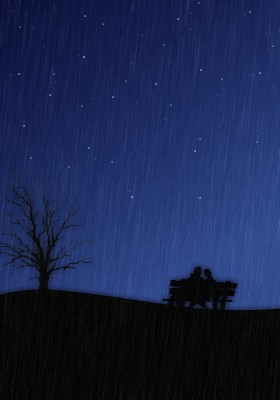
Evening All!
Trying to get a rain effect in Paint.net. Anyone got any tips? Also how to get it animated too.
Hope you like!
 Redsushi! Whoop! Whoop! Yes, that one!,
Mon 8 Sep 2008, 18:45,
archived)
I don't like rain particularly
Redsushi! Whoop! Whoop! Yes, that one!,
Mon 8 Sep 2008, 18:45,
archived)
I don't like rain particularlyanimation tips: gets two or three frames of rain, put a little motion blur on it, add sauce, put a donk on it: hey presto!
 mediocre ha ha ha, you're reading this,
Mon 8 Sep 2008, 18:47,
archived)
PUT A DONK ON IT!
mediocre ha ha ha, you're reading this,
Mon 8 Sep 2008, 18:47,
archived)
PUT A DONK ON IT!Donk donk donk donk donk!
Hows this?

(Hows this?
Redsushi! Whoop! Whoop! Yes, that one!,
Mon 8 Sep 2008, 18:52,
archived)
Blur all your dark shapes in a new layerInvert the colour on the new layer and put the
old dark shapes layer in front. Adjust
transparency of new layer to taste and mess about more.
Hey-presto! That mist you get as light catches
rain thats bouncing in a mist after hitting
a surface.
(old dark shapes layer in front. Adjust
transparency of new layer to taste and mess about more.
Hey-presto! That mist you get as light catches
rain thats bouncing in a mist after hitting
a surface.
 Letum Your Ad here £2.40,
Mon 8 Sep 2008, 18:51,
archived)
Coolio :)
Letum Your Ad here £2.40,
Mon 8 Sep 2008, 18:51,
archived)
Coolio :)I shall try this soon :) Thankee....
( Redsushi! Whoop! Whoop! Yes, that one!,
Mon 8 Sep 2008, 18:54,
archived)
I didn't get the effect I wanted here
The rain does not loop, but you can't notice.
I lated fixed this how I wanted it, but I can't find the final copy.
*edit*
This is just rain, I didn't use the mist/blur thing here.
Although the lamp blur is more pronounced than
it would be in a non-rain scene.
In the final version the rain blur is shown on
the mans hat, there is more rain and smaller
rain drops and the rain does not curve as it falls.
Letum Your Ad here £2.40,
Mon 8 Sep 2008, 18:58,
archived)
I love this,and I love these :D
( Redsushi! Whoop! Whoop! Yes, that one!,
Mon 8 Sep 2008, 19:14,
archived)
You forgot to put a donk on it mediocre ha ha ha, you're reading this,
Mon 8 Sep 2008, 19:03,
archived)
Just spitballing here, I've not tried this;Try making a seamless rain layer (using one of the methods someone else is bound to mention!),
duplicate the layer a few times and offset it about 25% vertically until you have a looping rain effect.
Put the layers over the frames and repeat (try and get the right number of frames so it'll loop at the end)
Sorry if that doesn't make sense, I'm just making this up as I go along :P
(duplicate the layer a few times and offset it about 25% vertically until you have a looping rain effect.
Put the layers over the frames and repeat (try and get the right number of frames so it'll loop at the end)
Sorry if that doesn't make sense, I'm just making this up as I go along :P
 ClanSoul,
Mon 8 Sep 2008, 18:51,
archived)
I shall try this also.
ClanSoul,
Mon 8 Sep 2008, 18:51,
archived)
I shall try this also.In other news, GET YOUR HAIR CUT HIPPY! ;D
How goes it?
(How goes it?
Redsushi! Whoop! Whoop! Yes, that one!,
Mon 8 Sep 2008, 18:55,
archived)
NEIN!It goes alright, thanks :D
I'm gonna use a rain effect when I get home.
I already had an idea of what to draw, and it's forming rather nicely in my noggin.
Thanks!
I'd best be off now, I'm at Grandma's and I'm leaving in five minutes.
:]
(I'm gonna use a rain effect when I get home.
I already had an idea of what to draw, and it's forming rather nicely in my noggin.
Thanks!
I'd best be off now, I'm at Grandma's and I'm leaving in five minutes.
:]
ClanSoul,
Mon 8 Sep 2008, 18:57,
archived)
That´s really nice.Is there a wallpaper size version, by any chance?
(,
Mon 8 Sep 2008, 18:59,
archived)
I can make you one if you like I guess :)What size?
( Redsushi! Whoop! Whoop! Yes, that one!,
Mon 8 Sep 2008, 19:13,
archived)
Also, you might want to add some clouds.Rain clouds
( Letum Your Ad here £2.40,
Mon 8 Sep 2008, 19:04,
archived)
Animate you'll probably have to use gimpIve tried animations in Paint.net and it didnt like it
( epiphany coming live from sweden,
Mon 8 Sep 2008, 19:05,
archived)
What I do is make the gifs and then use unfreez.It is uber shite but I haven't found any other freeware that was as simple :D
( Redsushi! Whoop! Whoop! Yes, that one!,
Mon 8 Sep 2008, 19:14,
archived)
whats unfreeze?My anims the few ive made have been in gimp, its really annoying
( epiphany coming live from sweden,
Mon 8 Sep 2008, 19:16,
archived)
I tried GIMP and wanted to murder it and its stupidCrash Bandicoot rip off logo!
Unfreez is just a little application that you drag and drop your gifs into and it makes them all animatey. Its ok as far as how simple it is to use and how quick it is, but you can't set different frame speeds for each frame.
(Unfreez is just a little application that you drag and drop your gifs into and it makes them all animatey. Its ok as far as how simple it is to use and how quick it is, but you can't set different frame speeds for each frame.
Redsushi! Whoop! Whoop! Yes, that one!,
Mon 8 Sep 2008, 19:23,
archived)