 Though this might condemn a person to hell...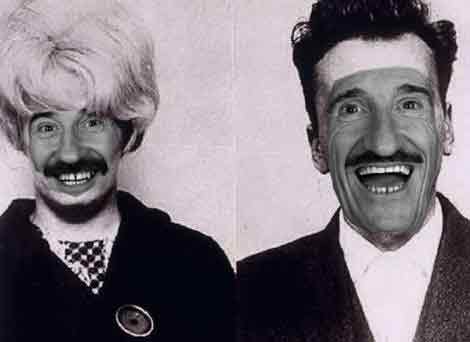
I'm a bit *new* at using Photoshop and I'd appreciate some advice about how to match the colours/blend the colours [or whatever the word is]. Can you help my improve my image?
I don't know the proper way to do itbut I'd greyscale both images, lighten barry a bit/ fuck with his curves, then do the layer with a really smudged edge.
Like I say though, that's probably not the right way to go about it, I just do what works for me.
(Like I say though, that's probably not the right way to go about it, I just do what works for me.
 Captain Wow currently being a cunt in Infamous,
Fri 23 Jan 2009, 13:51,
archived)
I've just basically gazzed him the same info
Captain Wow currently being a cunt in Infamous,
Fri 23 Jan 2009, 13:51,
archived)
I've just basically gazzed him the same infoaaaaaargh
mindpissage
(mindpissage
 bilbobarneybobs I'll be 14 in b3ta years soon.,
Fri 23 Jan 2009, 13:54,
archived)
That's two votes
bilbobarneybobs I'll be 14 in b3ta years soon.,
Fri 23 Jan 2009, 13:54,
archived)
That's two votesit IS the proper way then.
( Captain Wow currently being a cunt in Infamous,
Fri 23 Jan 2009, 13:55,
archived)
Did you use the phrase 'fuck with his curves'?Of course you did.
( An Eagle in Your Mind,
Fri 23 Jan 2009, 14:00,
archived)
Perfectly reasonable thing to say. Captain Wow currently being a cunt in Infamous,
Fri 23 Jan 2009, 14:01,
archived)
Ain't no disputing that. I'm going to see if I can work it into conversation in the pub later. An Eagle in Your Mind,
Fri 23 Jan 2009, 14:08,
archived)
OrAdd pink tone to the the guys to keep the old news paper feel.
Save a copy of them as a really low jpg and use that in a layer behind them to match the paper jpg image. Could use the back image with one of the layer blends but cant think which one.
Facet or add noise to any blur work done should you smudge or blur to blend the edges.
the curves will have to be fucked with rather a bit.
(,
Fri 23 Jan 2009, 14:01,
archived)
Save a copy of them as a really low jpg and use that in a layer behind them to match the paper jpg image. Could use the back image with one of the layer blends but cant think which one.
Facet or add noise to any blur work done should you smudge or blur to blend the edges.
the curves will have to be fucked with rather a bit.
See, if I was going to make it the pinkI'd still grey scale all of it, just I'd take it back to RGB once I'd finished it and THEN recolour.
Having fucked with the curves, of course.
(Having fucked with the curves, of course.
Captain Wow currently being a cunt in Infamous,
Fri 23 Jan 2009, 14:02,
archived)
you could just usecolorize, if there is such a thing
( Jamnog Sardines in her eyebrows, lobsters up and down,
Fri 23 Jan 2009, 14:06,
archived)
If there is, I've yet to find it. Captain Wow currently being a cunt in Infamous,
Fri 23 Jan 2009, 14:08,
archived)
well i would create adough nut selection around the seam and average soften and use some noise filters maybe screw around with the brightness and contrast and whack some purple hue on the Barry layer. but effectively get the same result. also my best tip for photo shop is to uninstall it and use paint shop pro. Not the best advice in the world.
( Jamnog Sardines in her eyebrows, lobsters up and down,
Fri 23 Jan 2009, 14:02,
archived)
Colours - no idea.Image - have you tried a different haircut? Maybe revisit your wardrobe - chuck out some of the older items and invest in some high quality design.
( barryheadwound Mul-ti-pass? Multipass!,
Fri 23 Jan 2009, 13:52,
archived)
you can fiddle with the hue/staturation and colour levels (i'm a not very good gimp tard)but i think there may be in photoshop for colour matching.
( k3b/-\b Peace man.,
Fri 23 Jan 2009, 13:53,
archived)
colour matching seems to be a good google term(
k3b/-\b Peace man.,
Fri 23 Jan 2009, 13:54,
archived)
have a look at this, it may helpwww.freakingnews.com/tutorial.asp?sid=17
although a good place to start is image- adjustments- brightness/contrast lighten it a bit then - colour levels add a wee bit of red/magenta ?
also set your eraser opacity to stun 50% ish and blend in the edges of the swapped faces a bit
basically keep fiddling with it till you get there
(although a good place to start is image- adjustments- brightness/contrast lighten it a bit then - colour levels add a wee bit of red/magenta ?
also set your eraser opacity to stun 50% ish and blend in the edges of the swapped faces a bit
basically keep fiddling with it till you get there
god save the queen making another unremarkable comeback,
Fri 23 Jan 2009, 13:59,
archived)
desaturate both images, scale and rotate to match the eye positions.adjustments-Levels: drop down the midtones and bring up the black to compensate.

(,
Fri 23 Jan 2009, 14:02,
archived)
^what he said god save the queen making another unremarkable comeback,
Fri 23 Jan 2009, 14:06,
archived)
bit. bloody. good. Captain Wow currently being a cunt in Infamous,
Fri 23 Jan 2009, 14:06,
archived)