 I hope...
This meets all the size limits etc.
Don't think I've posted it before.

(,
Fri 25 Jan 2008, 22:39,
archived)
Don't think I've posted it before.
Oooooh.Animations can be as large as 250kb, by the way, but that's lovely and effective as it is.
( Kamikaze Stoat £4.09,
Fri 25 Jan 2008, 22:40,
archived)
.
Kamikaze Stoat £4.09,
Fri 25 Jan 2008, 22:40,
archived)
.Cheers, I'm no expert on compressing files, and the original is over 500kb. O_o
Glad you like. :)
(,
Fri 25 Jan 2008, 22:42,
archived)
Glad you like. :)
I use the GIMP for gif animation optimizingsimple steps:
1. make your GIF with max colours (no dithering)
2. open gif in gimp
3. reduce the number of colours: switch to RGB and back to Indexed from the Image - Mode menu (no dithering, usually. dithering gives better looking pictures but tends to increase the file size a lot).
4. choose filters - animation - optimize (for gif)
save as gif.
If it's still too big, go back and reduce the amount of colours even more (powers of two are good: 2, 4, 8, 16 - anything in between won't help much) or reduce the image size.
(1. make your GIF with max colours (no dithering)
2. open gif in gimp
3. reduce the number of colours: switch to RGB and back to Indexed from the Image - Mode menu (no dithering, usually. dithering gives better looking pictures but tends to increase the file size a lot).
4. choose filters - animation - optimize (for gif)
save as gif.
If it's still too big, go back and reduce the amount of colours even more (powers of two are good: 2, 4, 8, 16 - anything in between won't help much) or reduce the image size.
 but the hedgehog can never be buggered at all foreskin of the apocalypse,
Fri 25 Jan 2008, 22:49,
archived)
..
but the hedgehog can never be buggered at all foreskin of the apocalypse,
Fri 25 Jan 2008, 22:49,
archived)
..you make it sound so simple, my cat could do it.
I'll give it a go in future.
(,
Fri 25 Jan 2008, 22:50,
archived)
I'll give it a go in future.
it's pretty easygetting the most out of gifs is harder, but for captured video that's more or less the best you can do.
if you have largish parts of your animation that are 100% static between frames they'll optimize very well, which is why drawings / flash-type animations with very few colours in large sections compress so good.
(if you have largish parts of your animation that are 100% static between frames they'll optimize very well, which is why drawings / flash-type animations with very few colours in large sections compress so good.
but the hedgehog can never be buggered at all foreskin of the apocalypse,
Fri 25 Jan 2008, 22:54,
archived)
my tips above will probably work on image ready toobut I don't have it, so you'll have to translate :)
edit: showing off:

(edit: showing off:
but the hedgehog can never be buggered at all foreskin of the apocalypse,
Fri 25 Jan 2008, 22:55,
archived)
image ready has a small arrow that one can clickand choose 'optimise to filesize'.
This, as might be expected, optimises to a filesize.
(This, as might be expected, optimises to a filesize.
 LordManley twitter.com/LordManley,
Fri 25 Jan 2008, 22:58,
archived)
If it do be
LordManley twitter.com/LordManley,
Fri 25 Jan 2008, 22:58,
archived)
If it do beat all like Photoshop CS3 (which absorbed IR), you can choose to "optimise to filesize" - if the result doesn't look good at the desired filesize, then play around with the width and height, chop off as much background as you can, and bob's your ankle.
(,
Fri 25 Jan 2008, 23:07,
archived)
 Lonely bike......
Watching the world whizz by....
Most woo!
(Most woo!
Mstandot I suppose I should post more often.,
Fri 25 Jan 2008, 22:41,
archived)
Watching the world pass byVery nice.
Yay for long exposures!
(Yay for long exposures!
 Tribs 🦇 ↓ dn ʎɐʍ sᴉɥʇ ↓🦇,
Fri 25 Jan 2008, 22:41,
archived)
In other news...
Tribs 🦇 ↓ dn ʎɐʍ sᴉɥʇ ↓🦇,
Fri 25 Jan 2008, 22:41,
archived)
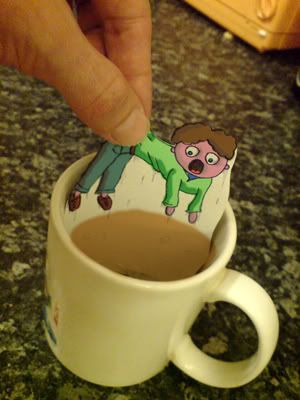
In other news...I have been mucking about with post-its and photoshop (to colour).
(,
Fri 25 Jan 2008, 22:44,
archived)
arf!Try to get still images under 50kb though, or people will get upset!
( Kamikaze Stoat £4.09,
Fri 25 Jan 2008, 22:47,
archived)
Erp!Pants! I thought this was small enough.
I shall prepare for the flaming. ;)
(,
Fri 25 Jan 2008, 22:48,
archived)
I shall prepare for the flaming. ;)
 Very good
was it animated gif? Sorry - total novice here
( The Twisted Omentum vidi vici veni,
Fri 25 Jan 2008, 22:45,
archived)
The Twisted Omentum vidi vici veni,
Fri 25 Jan 2008, 22:45,
archived)