 honestly dont know why I do thease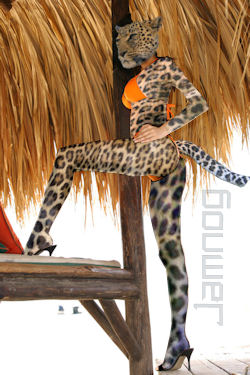
I know i have missed several bits.
In other versions of this picture it
becomes more leopard than woman.
so I gave up.
 Jamnog Sardines in her eyebrows, lobsters up and down,
Fri 12 Dec 2008, 22:08,
archived)
awww I would give you my candle
Jamnog Sardines in her eyebrows, lobsters up and down,
Fri 12 Dec 2008, 22:08,
archived)
awww I would give you my candlebut i dont know how
( Jamnog Sardines in her eyebrows, lobsters up and down,
Fri 12 Dec 2008, 22:12,
archived)
Mine isnt for another 6 months :( epiphany coming live from sweden,
Fri 12 Dec 2008, 22:13,
archived)
happy b3taday 1 giraffe leg woman!
epiphany coming live from sweden,
Fri 12 Dec 2008, 22:13,
archived)
happy b3taday 1 giraffe leg woman! SkUG >_O i got a couple of stitches in my eyeball... ow,
Fri 12 Dec 2008, 22:09,
archived)
thanks ;) Jamnog Sardines in her eyebrows, lobsters up and down,
Fri 12 Dec 2008, 22:36,
archived)
Your icon...
SkUG >_O i got a couple of stitches in my eyeball... ow,
Fri 12 Dec 2008, 22:09,
archived)
thanks ;) Jamnog Sardines in her eyebrows, lobsters up and down,
Fri 12 Dec 2008, 22:36,
archived)
Your icon...IT'S ON FUCKING FIRE!
Nicely done on yiffy leopardwoman
(Nicely done on yiffy leopardwoman
 barryheadwound Mul-ti-pass? Multipass!,
Fri 12 Dec 2008, 22:11,
archived)
ty barry
barryheadwound Mul-ti-pass? Multipass!,
Fri 12 Dec 2008, 22:11,
archived)
ty barrysome of us can tell the difference between a leopard and a geoffraffle *glares at skug*
( Jamnog Sardines in her eyebrows, lobsters up and down,
Fri 12 Dec 2008, 22:13,
archived)
they both taste earthy SkUG >_O i got a couple of stitches in my eyeball... ow,
Fri 12 Dec 2008, 22:19,
archived)
TJ : what vechicle is that at 1.09uk.youtube.com/watch?v=heICakyN4Wg&feature=rec-HM-r2
I want one :D
(I want one :D
SkUG >_O i got a couple of stitches in my eyeball... ow,
Fri 12 Dec 2008, 22:20,
archived)
Looks like a car with massive wheels epiphany coming live from sweden,
Fri 12 Dec 2008, 22:26,
archived)
if memory serves correct its called a SUGG or something... dammit my brains stopped working SkUG >_O i got a couple of stitches in my eyeball... ow,
Fri 12 Dec 2008, 22:28,
archived)
no its sweedishi can't for the life of me think what its called
( SkUG >_O i got a couple of stitches in my eyeball... ow,
Fri 12 Dec 2008, 22:37,
archived)
according to some website its a volvo...but i'm almost sure its not... lemme research some more :D
edit : YEAH its a VOLVO SUGGA YEAH!
(edit : YEAH its a VOLVO SUGGA YEAH!
SkUG >_O i got a couple of stitches in my eyeball... ow,
Fri 12 Dec 2008, 22:41,
archived)
Happy B3taday!
 Flowerpot No longer has the vapours thanks to DTH,
Fri 12 Dec 2008, 22:13,
archived)
Happy Birthday!
Flowerpot No longer has the vapours thanks to DTH,
Fri 12 Dec 2008, 22:13,
archived)
Happy Birthday!again. Is that feral from X-Force yyyyyyears ago from Marvel?
( riverghost servicing your mum since,
Fri 12 Dec 2008, 22:13,
archived)
nope, but if you squint kinda looks like
riverghost servicing your mum since,
Fri 12 Dec 2008, 22:13,
archived)
nope, but if you squint kinda looks likehmm ty for the happy bday rg and fp
( Jamnog Sardines in her eyebrows, lobsters up and down,
Fri 12 Dec 2008, 22:15,
archived)
wank materialthat's why you do it.
( Thor_sonofodin has done things, terrible things on,
Fri 12 Dec 2008, 22:14,
archived)
yes i suppose i was in denial when i posted Jamnog Sardines in her eyebrows, lobsters up and down,
Fri 12 Dec 2008, 22:16,
archived)
denial is goodpalin had the same effect on me
also, nice one
(also, nice one
god save the queen making another unremarkable comeback,
Fri 12 Dec 2008, 22:21,
archived)
the rubber clad palin i made? Jamnog Sardines in her eyebrows, lobsters up and down,
Fri 12 Dec 2008, 22:26,
archived)
no, the dozen palins i maderubber palin is also good
( god save the queen making another unremarkable comeback,
Fri 12 Dec 2008, 22:29,
archived)
ahhyes, I know what you mean
( Jamnog Sardines in her eyebrows, lobsters up and down,
Fri 12 Dec 2008, 22:30,
archived)
She's Show Shex Shay . . . have another candle !
 Valin I changed glasses while I wasn't looking,
Fri 12 Dec 2008, 22:14,
archived)
Valin I changed glasses while I wasn't looking,
Fri 12 Dec 2008, 22:14,
archived)

 Ink . . . out . . . Valin I changed glasses while I wasn't looking,
Fri 12 Dec 2008, 22:18,
archived)
Happy staying enlisted on a website for any amount of time day! mediocre ha ha ha, you're reading this,
Fri 12 Dec 2008, 22:17,
archived)
thanks that means allot to me
Ink . . . out . . . Valin I changed glasses while I wasn't looking,
Fri 12 Dec 2008, 22:18,
archived)
Happy staying enlisted on a website for any amount of time day! mediocre ha ha ha, you're reading this,
Fri 12 Dec 2008, 22:17,
archived)
thanks that means allot to meI will cherish your word and keep them close to my heart on this special day.
[/frilly font]
([/frilly font]
Jamnog Sardines in her eyebrows, lobsters up and down,
Fri 12 Dec 2008, 22:22,
archived)
Happy B3taday, Jamnog!...you crazy cat-lady obsessed chap.
I really want to know how these texture replacements are done. I am a bit Photoshoptarded. Is it an erase and replace, where you paste the 'background' over top of the catty source? That's the only way I can think of, but that wouldn't explain the girl I squirrelised for you the other day and it wouldn't explain the way that the texture wraps...
Can you recommend a good tutorial please?
(,
Fri 12 Dec 2008, 22:18,
archived)
I really want to know how these texture replacements are done. I am a bit Photoshoptarded. Is it an erase and replace, where you paste the 'background' over top of the catty source? That's the only way I can think of, but that wouldn't explain the girl I squirrelised for you the other day and it wouldn't explain the way that the texture wraps...
Can you recommend a good tutorial please?
nah its a peice of pisscut around a part of the ladie copy
paste onto a cat
select the layer below, copy
go back to source make new rasta layer
paste into selection maybee drop the transparancy of your new rasta layer
and without loosing the line you can go back and clarify the underneath image or change the hue saturaiton and lightness. or reduce the colours and increase the contrast... till your happy they take me about 2 hours of mucking about before i give up.
(paste onto a cat
select the layer below, copy
go back to source make new rasta layer
paste into selection maybee drop the transparancy of your new rasta layer
and without loosing the line you can go back and clarify the underneath image or change the hue saturaiton and lightness. or reduce the colours and increase the contrast... till your happy they take me about 2 hours of mucking about before i give up.
Jamnog Sardines in her eyebrows, lobsters up and down,
Fri 12 Dec 2008, 22:26,
archived)
Ah......So it's all about transparency of the layers, and merging them?
Thank you, Jamnog - nice of you to educate this poor excuse for a B3tan.
I will have to have a play, (at some point after I regain sobriety).
(,
Fri 12 Dec 2008, 22:38,
archived)
Thank you, Jamnog - nice of you to educate this poor excuse for a B3tan.
I will have to have a play, (at some point after I regain sobriety).
its all goodI found if you play about with it you eventually get anything but tutorials would probably be faster. I never use tutorials I use undo and gin.
( Jamnog Sardines in her eyebrows, lobsters up and down,
Fri 12 Dec 2008, 22:52,
archived)
.Excellent! We both subscribe to the same newsletters, I suspect.
(,
Fri 12 Dec 2008, 23:05,
archived)
COCKSUCKER, MOTHERFUCKER, SHOOOOOOOT YER LOAD. (|D[ekionplexis B3ta.com: fictional child porn is OK,
Fri 12 Dec 2008, 22:18,
archived)
Happy b3taday!
(|D[ekionplexis B3ta.com: fictional child porn is OK,
Fri 12 Dec 2008, 22:18,
archived)
Happy b3taday! my other username is a porsche , posting shit pictures so you don't have to,
Fri 12 Dec 2008, 22:19,
archived)
Happy candles! Woo to the pic, too!
my other username is a porsche , posting shit pictures so you don't have to,
Fri 12 Dec 2008, 22:19,
archived)
Happy candles! Woo to the pic, too!:)
( elephant rider property shark sighted!,
Fri 12 Dec 2008, 22:19,
archived)
thanks thanks thanksI try a thanks to each one it wont let me.
( Jamnog Sardines in her eyebrows, lobsters up and down,
Fri 12 Dec 2008, 22:33,
archived)